I am a ethical hacker who loves discovering new elements in computer,which I would like to share with u all through this blog. So stay tuned to it to learn new secrets of hacking.
As you Know that,Mozilla Firefox is a most powerful and common browser,which is used by most of the internet users,which is containing millions of addons,which helps the browser to expand its features according to user's requirement.If you want to block some websites in your own mozilla firefox browser.Then this post is for you.Blocksite is one of the firefox add-on which is used to block a list of websites in firefox.We can also protect it by password, so that others cannot able change the setting or delete the websites without your access.
Follow These Steps to Block any website in mozilla firefox browser
1 First of all click here and Get plugin then Open Firefox browser and click “Tools” and select Add-ons. Type “BlockSite” in the search bar at the top right corner of the window and press “Enter”.
2 Wait for the page to load. In the search result, BlockSite will be on the first place. Click the “Install” button next to the BlockSite plugin. It will take less than 4 seconds to install according to your broadband speed. Once installation is complete, restart the Firefox browser.
3 Go to Tools and select Add-ons. Click “Extensions” tab, you will find the list of plugin installed on your Firefox. Now click “Options” next to BlockSite plugin. A pop up window will open to configure the plugin as your need. By default, 3 check boxes checked and “Blacklist” radio button selected.
4 Under “Authentication”, select “Enable Authentication” and type password in the below text field, which block others from changing the settings in BlockSite.
5 Click “Add” button and enter the URL you want to block, and then click “OK”. Repeat this step to add more websites to block. Once you finished, click “OK”. Once you restart the Firefox, you can’t access the list of websites in the Blacklist.
Please Like ,if You like my post :-) For any queries,ask me in comments :-)
Hello My Dear Friends,Today i am Going to share some safety tips for girls and womens to use social networking websites like facebook ,twiter,Etc.
Have you Ever Thought,Your pictures can be made nude using photoshop,and can be spreaded,Have you ever thought,a fake account has been made with your name ,with your picture as profile pic.and upto what extent ,it can harm your reputation and your livelihood.
So This post is very useful.You must read it carefully and must implement these countermeasures to be safe.
Important Tips
1. Never set
your original pic as your profile pic, otherwise any of your friends or
stranger can download it and use it to create a fake ID.
2. Hide your friendlist otherwise hacker will send friend request to friends after making the fake ID of you.
3. Hide your email id or phone number otherwise anyone can use it in fake account.
4. Never accept the friend requests of unknown people otherwise they can harm you, because one or more of them can be a hacker.
5. Never told your personal info to any stranger otherwise he/she can use your detail to guess your password.
6. Block the suspected person so that he can not access your account.
7.You should not post your original picture on any internet source,as your pictures can be modified by any of your friend or any hacker,to harm you,as reputation or repect for girls matters alot in these cases.If you can avoid,then please avoid sharing your pictures,Otherwise.you must use sharing filter to share with very close friends and relatives only.
If your have any personal account on facebook or any other social
networking website then you'll surely follow these tips to save yourself
from insult...
Kaspersky Security Network is an integral part of Kaspersky Lab
technology. With its ‘cloud’ architecture KSN automatically detects and
blocks unknown malware and infected/dangerous websites, filters spam,
protects children from unwanted content and lots more.
Our aim is for users to always have as full a picture as possible of the
current threat landscape around the world. That’s why we have come up
with the Irida screensaver. It displays statistics about the latest
threats that have been detected and blocked using KSN and is updated
every 12 hours.
In my Last post,You all know get to know about the Ip address and its Importance.Now,i will Begin with the structure of IP address,and then i will discuss about the methods,that how to get useful information about the victim's network.and how to represents a Ip address.
Structure Of ip Addresses
Ip address is a 32 bit address divided into 4 fields of 8 bits,each containing a number between 1 and 255 with a small pause between them.A normal Ip address might look like 203.94.35.12 .In the above ip address,->
203 represents first 8 bits 94 represents second 8 bits 35 represents third 8 bits 12 represents fourth 8 bits
Classes Of IP Address
Ip Addresses are Divided into Five Classes .On the Basis of these Classes,You can easily get some useful information about the victims network by simply viewing the Ip address.
Class Range Class A 0.0.0.0 - 126.255.255.255 Class B 128.0.0.0-191.255.255.255 Class C 192.0.0.0-223.255.255.255 Class D 224.0.0.0-239.255.255.255 Class E 240.0.0.0-255.255.255.255
From the above table ,You can Easily identify the class of ip Address for Any Known IP Address.For example- IP address 202.127.98.78 is a Class C Ip Address,Because the First 8 bits lie in the range of Class C Ip addresses.So you Only need to check only first 8 bits to know,in which class the given Ip address lies. Now,You are able to know atleast the class of IP address,in which it lies.Now what information you can get from the ip address.? For example-The Ip address is aa.bb.cc.dd
1.If the ip address belongs to Class A,Then First 8 Bits would be used as network Id,and rest of the 24 bits belongs to host's id. 2.If the ip address belongs to Class B,then First 16 bits for network id,and rest 16 bits for Host's Id. 3.If the Ip address belongs to Class C,then first 24 bits for network id,and rest 8 bits for Host Id. 4.if the Ip address belongs to Class D,It Represents a 32 bit Multicast Group Id. 5.Class E IP address are not in use.
Now the question is,what do u get to know from the network id and host id. network id can give you the idea,the how many networks exist .and it have a network id dis one.and host id give you information about the number of hosts in this particular network.to which victim's Ip belongs.
How to Know Your Own Computer's IP address
Its very simple to know your owns computers ip address,by which,you can be contacted.or which is being recorded by the various websites,which you visits.or which helps the police to caught you,if you are doing any illegal or malicious activity on internet. i am sure,you must be ambicious to know it now.
So,now You can Know your own ip Address,And practise to get infromation about your network using the method taught earlier in this post.This is your work now.if any problem arises,then please ask me in comments.
Representation of IP address
We can Represents Ip address in various forms,like octal,hexadecimal notation,etc.But We Usually express in Decimal Notation.Now i am going to discuss about the various representation of ip addresses by taking a live example:-
For Example -www.yahoo.com
Firstly we need to find its Ip address,
Just Go to Run
And enter Cmd there,and press Ok.
Write the command "ping www.yahoo.com".
Decimal Notation of Ip address- 106.10.170.118
Domain Name server (DNS)- www.yahoo.com
Hexadecimal Representation of Ip address- 6AAAA76
Binary Representation of Ip adress- 110101010101010101001110110
Octal Representation of Ip address- 0152.012.0252.0166 (Note:- Prescribe every bit with 0)
Dword Representation of Ip address- 111848054(its a decimal notation of the hexadecimal in one)
Note:-You can use Programming Calculator In Windows Os To carry out These conversions
Trick of the Hacker: You can Use These Ip addresses,if some website is Blocked like in your schools,colleges and organizations.But some Browsers Some notations,some not.So try Well.Play with it.As much you try,you will gain some knowledge.
If Any Questions or Queries,Ask me in Comments,:-)
IP address is Internet Protocol address,which is unique address given to any computer or device connected to network or internet.
->Every System connected to a network has a unique Ip address associated with itself.
->All data sent or recieved by the system will be Addressed from or to its Ip Address
->Its a unique Identity of computer at which,it can be contacted.
->Ip address is just like a mobile number in real world-An identity can be contacted.
For example->just like in real world,the mobile phone number is there to contact you.its a unique number,like that only.ip address is in virtual world,which is used to address your computer on the network.
So If i am a Hacker,My first step is to Find the victim's Ip address,Before Attacking to it.Hence According to Security purposes,we Must Take Certain Countermeasures to hide your ip address,or hide your ip Address from the bad guyz,so that they might not break into your computer.
Do You Know?the Website you visit daily Records the Ip address of the visitors..?It means,someone is there in this world,who is watching you.And if You do any illegal work.u can be caught easily by just finding your ip address and just tracing it..
One more Example,i need to specify here To make you clear the importance of ip address.have you ever think,if you remember your password of your google account.Then.if you open the google.com ,then how the google automatically redirects to your account.and your every search keyword,clicks on the pages in search engine results is recorded in google database with your email address and Ip address.hence your Every moment on internet is watched.
Now you know the importance of the Ip address.In my next article ,you will study about the structure of ip address and how to get some useful information by just viewing the Ip Address.
Submit Your resume To get Placed in Reputed IT companies
To get a job in any field in the top most companies like google,yahoo.Post You Resume in two websites given below,and shape your career in a way,you like.You can also post your cv or resume on these websites for the post of hacker.As 2005 survey conveys that-"every year india needs more than 78000 hackers"
Post for hackers can apply are-System administrator, network admininstrator ,IT networking manager,can apply in the field of security too.
Untitled Document
Market is bustling with Jobs; everyday top companies are hiring hundreds of deserving candidates by scouting them from TimesJobs.com.
Still waiting for your appraisal? It is time you jump on the bandwagon and get the hike you deserve.
1000s of new Job Opportunities have been recently posted on TimesJobs.comby top employers in IT, BFSI, Manufacturing & Engineering, Automobile and other growing industries. Make the most out of this opportunity.
It is time to get the appraisal you deserve! Register now on TimesJobs.com
A Great Career & a better Salary await you!
Warm Regards, TimesJobs.com
------------------------------------------------------------------------------------------------------------
Hi all My friends,Today i am going to show you to update your status with a blank status.which must be very different and surprisngly for you .
Steps To Update blank Status On facebook
First go to status post area.and Hold Alt and press 0173 from the numeric keypad,dont use the numbers which are above alphapet keypad.and then click on post button to post a blank status on facebook as shown in the above picture.
Steps To put Blank Comment On facebook post
This is also same as above..but the difference is that .first go the comment box,where you want to leave a comment..Then follow the steps as prescribed above.. Hit like..:-)If you like my post :-)
Hackers and Crackers are seems to be same words ,But a Great difference exists between Hackers and Crackers. First of all ,Hackers and Crackers have a same amount of knowledge and Experience,but the difference is about,How they are using their knowledge.Hackers are good guys,who use their Knowledge in positive direction.like hackers are appointed by companies and police to solve their problems or cases.On the other hand ,Crackers are Bad guys,who use their knowledge for Illegal and negative purposes.like Crackers stole the money from the bank by hacking into the bank's website.
Hackers Crackers 1. Lots of knowledge and experience 1. Same amount of about computers Knowledge and experience
2. Good Guy 2. Bad guy
3. Strong Ethics 3. Poor Ethics
4. No Crime commited 4. Commits Crime
5. Fights Criminals,defend From 5. They are Criminals Bad Crackers.
I am Starting This tutorial With a simple question,which usually arise in my mind.and trust me,you must be having a wrong thinking about it.question is -Who is a Hacker? To get the ans to this Question.You need to know ,who is not a Hacker.So Hacker is not
1. A Criminal 2. The person who Releases Viruses 3. A Teenager sitting in a Dark Room eating pizzas and hacking into the fbi website. 4. Not always a Computer Related Person.means can also belongs to some other field too. 5. not even somebody,who can crack password to all the websites or softwares. 6. Not also,who stole the money from bank by hacking into bank Server.
By Knowing these things,u might be shocked,that if the person i have discussed above is not a hacker.then you might be thinking wrong about the term hacking or hacker.But this is not your fault.This False Misconceptions Has been Created by Media and Newspapers.So Now U all get to Knows Who Is not a Hacker.Now its Very easy for you to understand,Who Is a Hacker?
Hacker Is who
1. The Person ,who thinks outside the box 2. who wants to Test His/Her Limits. 3. Who wants to try such things which are not given in manual. 4. Has Unlimites Curosity to work. 5. Who Discovers Unknown Features and Properties. 6. Someone who is dedicated to his knowledge 7. Highly Creative. 8. who Bellieves in Stretching the Limits.i.e who wants to test his/her limits,that upto what extent,He/she can go
After Reading This above discussed points on who is a Hacker.We can say That.All the Scientists,Discoverers,Mathematicians Can Fall under the Category of Hacking Or Hacker.Like Albert Einstein,Issac Newton. One more Example i want to substitute Here,which will make you clear upto more extent,that Suppose The man,who rides the bike very fast,and he is very expert in driving and stunting,and making new stunts.Or A women who used to practise making of new Dishes in cooking.Then we can also say that,This man and woman is also a Hacker. Now U must be having a Idea about who is a Hacker and who is not.Now i am Going to Discuss about the computer Hacker.Computer Hacker is one who Discovers new features ,discover bugs in software and help the company to Defend To being hacked.
Modern Day Hacker | How to Become a Hacker
If You want to Become a Hacker,You need to Follow these four points,which i am Providing Below.:-
1.You should be knowing Atleast one programming Language very Nicely.If i am Telling about programing language,then i must be talking about high level languages like C,C++,Etc
2.U should be Networking Guru.i.e You should knows the basics of networking,Means How the internet works,how the communcation sets up between two hosts,how the network is working.
3.you should know about the basics of unix or linux,as Unix is a heaven for hackers.u can go with linux,because unix only runs in server.and linux is GUI version of unix.
4.Last,But Not the Least Hacking Attitude-Criminal Mind.This is the One of the Major aspect to become a Hacker.that You should Think like a criminal.i.e like you should think how to crack into fb server while accessing your Fb account.
Now You must be knowing about the definitions, i think,all your misconceptions has been vanished now.If any Query,you can ask me in comments:-)
Access Banned Torrent and Video Sharing Sites in India:Working Method
As we all know that,Indian Government had blocked various filesharing ,torrents and video sharing websites due to claim of pirated content on these websites.So Different Isp's has blocked different websites.But You can still Access Those websites,As Democratic Hackers Team had posted one method Few days ago.But i think,it has stop working in some states.Hence Democratic Hackers is back with some new tricks and tweets by which torrents and video sharing websites can be accessed in India. i have discussed the mechanism of blockage of websites in my previous post of accessing blocked websites in india. For example-you need to access thepiratebaywhich is famous torrent website. If i try to access simply .then the webpage looks like this:-
1st Trick :
I want to discuss with you is simply use https inspite of http in url like https://thepiratebay.se.
It may happen ,that this trick might not work in accessing all the torrents website,as its working to access thepiratebay ,But it might not work for any other blocked website .For that Case,i am discussing the second trick,which is applicable to every case. 2nd Trick: Just Use one Russian Proxy server.which is mantained by hackers,which is the most anonymous proxy server in the world. The website is www.anonymizer.ru
Google terminal-Google Search engine in Terminal View
As You have seen Google gravity which was searching on google without gravity,and Google under water which was the experience of using google under sea. Now Democratic Hackers has came up with the new google search experience which is google terminal ,which make us feel to search google in Linux terminal .It looks like:-
To experience it Click here Have a pleasant and new experience of using of searching on google.i like it very much personally.try it.i think you will like it ..
ZIP Password Recovery 2.0.0 with Serial Free Download | Crack Any Password Protected Zip File
Do you want to find your ZIP password back? Crack PDF ZIP Password Recovery can help you recover ZIP password in case you forgot or lost the passwords for your ZIP/WinZIP/PKZIP archives. This tool enables you to adopt three strategies to recover ZIP password: the customizable brute-force attack, the brute force attack with trying all combinations, and the dictionary-based attack. With the assistance of Crack PDF ZIP Password Recovery, you can easily get access to your password protected ZIP files again.
-Recovery your forgotten ZIP password in three different ways -Brute Force Attack with User Defined Mask -Brute Force Attack with Trying All Combinations
Feature List:
-Able to recover any password for any WinZip/ZIP/ PKZ /ZIP archive. -Support self-Extracting Zip Files (SFX). -Able to recover long passwords. -Three methods are provided to recover ZIP passwords: the brute-force attack (trying all the -combinations), the brute-force attack and the dictionary attack. -Support advanced 128-bit and 256-bit AES Encryption. -Allow you to add dictionary files. -If any part of the password is known, you can select options to minimize recovery time. -Automatically save password recovering state and can resume after a moment of pause or a crash. -Auto shutdown the computer after recover ZIP password.
100+ run commands in Windows | 100 Shortcut commands for different function
How to use these commands? 1. firstly,click to start button . 2. Then, Select run from there, here you can enter these 100+ commands to open different tools fastly .
The lists of commands are as follows -:
Accessibility Options : access.cpl
Add Hardware: hdwwiz.cpl
Add / Remove Programs: appwiz.cpl
Administrative Tools : control admintools
Automatic Updates: wuaucpl.cpl
Wizard file transfer Bluethooth: fsquirt
Calculator: calc
Certificate Manager: certmgr.msc
Character: charmap
Checking disk : chkdsk
Manager of the album (clipboard) : clipbrd
Command Prompt : cmd
Service components (DCOM) : dcomcnfg
Computer Management : compmgmt.msc
DDE active sharing : ddeshare
Device Manager : devmgmt.msc
DirectX Control Panel (if installed) : directx.cpl
DirectX Diagnostic Utility : dxdiag
Disk Cleanup : cleanmgr
System Information=dxdiag
Disk Defragmenter : dfrg.msc
Disk Management : diskmgmt.msc
Partition manager : diskpart
Display Properties : control desktop
Properties of the display (2) : desk.cpl
Properties display (tab "appearance") : control color
Dr. Watson: drwtsn32
Manager vérirficateur drivers : check
Event Viewer : Eventvwr.msc
Verification of signatures of files: sigverif
Findfast (if present) : findfast.cpl
Folder Options : control folders
Fonts (fonts) : control fonts
Fonts folder windows : fonts
Free Cell ...: freecell
Game Controllers : Joy.cpl
Group Policy (XP Pro) : gpedit.msc
Hearts (card game) : mshearts
IExpress (file generator. Cab) : IExpress
Indexing Service (if not disabled) : ciadv.msc
Internet Properties : inetcpl.cpl
IPConfig (display configuration): ipconfig / all
IPConfig (displays the contents of the DNS cache): ipconfig / displaydns
IPConfig (erases the contents of the DNS cache): ipconfig / flushdns
Shutdown windows xp fast | speed up windows Xp shutdown
How to shutdownwindow xp faster When you shut down Windows XP, the OS tries its best to make sure that all services (they help run things like graphics, printers etc) are shut down. But there are times when they don't close, thus Windows XP tries to give it the chance to shut down itself. This amount of time that windows waits for the service to close is stored in the system registry. If you modify this setting, then windows will shut down the service earlier. To modify the setting, follow the directions below:
Then as under
1)Start – Run – Regedit Navigate to the following Registry key: HKEY CURRENT USER\Control Panel\Desktop
* Double click on the AutoEndTasks entry and replace the 0 with a 1 in the Value data text box For the next two, if the dword value indicated does not exist, create it:
* Double click on the WaitToKillAppTimeout entry in the right pane and change the Value data to 2000
* Double click on the HungAppTimeout entry in the right pane and change the Value data to 1000 Reboot
* If still having a problem, make the next change:
* Right-click on WaitToKillServiceTimeout and change it to 2000 NOTE :-The lowest value Windows will recognize is 1000 (1 second)More Tricks and Hacks ..
Nowreboot or restart your computer, You will be able to shutdown your window xp faster.
Advance Rar Password Recovery Free Download with serial | Crack Any Rar Passwords Protected File
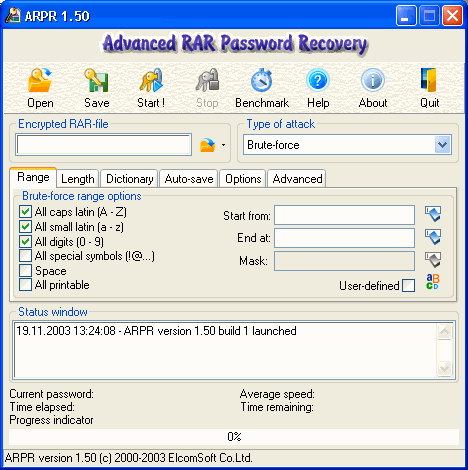
This program recovers forgotten passwords for RAR archives. Recovery runs in the background and resumes on the next system start-up. When you have completely forgotten a password, Advanced RAR Password Recovery will run a brute-force attack that applies all possible combinations one by one. In such a case, you can set the minimum and maximum number of characters and the character sets you used (letters, numbers, and non-English characters). If you recall part of the password, you can restrict the search area with a mask such as m***l. If you have used a meaningful word for your password, the dictionary attack helps. You can plug in external dictionaries and check all possible lowercase and uppercase combinations. To decrease recovery time, the program optimizes its code for each type of processor. The trial version limits recovery to three-letter combinations, which doesn't give you the opportunity to fully evaluate performance. If you've forgotten the password for an important archived document, however, Advanced RAR Password Recovery may save you.
Type 'Zerg Rush' Into Google for a Pleasant Surprise]
Google is giving us another reason to goof off on a Friday with an Easter egg related to the popular game StarCraft.
If you type "Zerg Rush" into Google, the "O's" in Google take over the page. If you double click, your cursor turns into a plus sign. Click on the O's and you wipe them out. Google then tabulates your score and, in a social media twist, lets you post your score on Google+.
For the uninitiated, Zergs are an alien race of insectoids in Blizzard Entertainment's StarCraft. In the game you "rush" them by amassing your battle units and blitz them.





 Step 2: It will open the Registry Editor of your Windows 7